
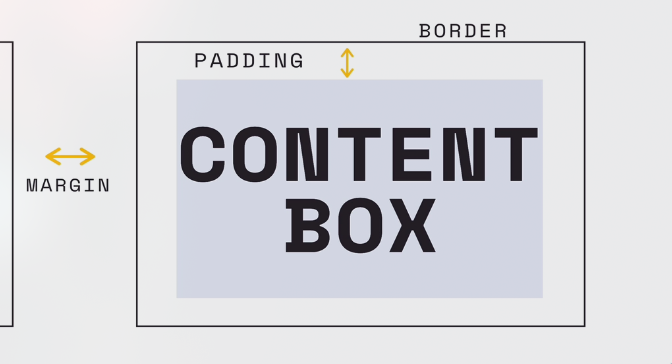
Each element on a webpage takes up space in the shape of a box. Each element’s box has three different properties: border, padding and margin.
Width and height
The width and height property control the width and height of the content box. By default, it sets the width of the content area (meaning, how much space the content takes up).
Border
Is the line around the elements and is the most outer part of the box of an element. Properties such as the thickness, colour and the style of the border line can be changed.
Box sizing property
You can set how the total width and height of an element is calculated. For example, you can make the border subtract into the width of the element instead of being on top. By default, the box sizing width is based on the size of the content box and does not include the padding, border or margin.
Padding
Padding is the space between the content and the border. Can change the width and height.
Margin
Between other elements, so on the outside of the border. Can change the width and height. The body also has a margin by default. It’s common practice to set this to zero most of the time.